In this tutorial you will learn 4 ways to install and run n8n. You can choose what suites you.
- Install and run n8n – fastest way.
- Install and run n8n on Docker.
- Install and run n8n and PostgreSQL on Docker.
- Install and run n8n and PostgreSQL without Docker.
There are some prerequisites and Assumptions.
- For demonstration purpose i have prepared the server on amazon lightsail, Basically a linux instance where i have installed nginx, certbot and configured a reverse proxy for domain demodev.app see This tutorial here to know how to install nginx and certbot and prepare reverse proxy.
- Docker is installed on the server This tutorial here to know how to install and configure Docker and work with reverse proxy.
- Postgres is installed on server, if not we will do this in the tutorial as well so you don’t need to worry about it.
If you don’t know how to install certbot, Nginx, docker please go through This tutorial here to know more about it and prepare your server.
Install and run n8n
To run n8n directly without anything else we need node.js. If you don’t have node js you can follow the steps below and install node.
Install node.js
Installing node.js really easy, you just need to visit nodejs.org and go to download page, from there you will find multiple options to choose the version and method how you want to install. Becuase i am using ubuntu 24.04 i’ll choose linux and latest LTS version of the node, then copy paste the command on my terminal to install node.
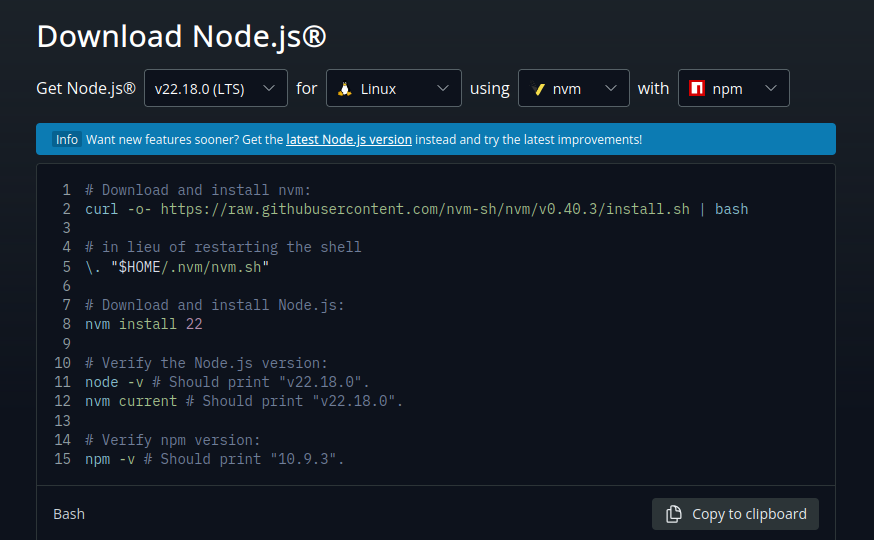
# Download and install nvm:curl -o- https://raw.githubusercontent.com/nvm-sh/nvm/v0.40.3/install.sh | bash
# in lieu of restarting the shell\. "$HOME/.nvm/nvm.sh"
# Download and install Node.js:nvm install 22
# Verify the Node.js version:node -v # Should print "v22.18.0".nvm current # Should print "v22.18.0".
# Verify npm version:npm -v # Should print "10.9.3".
It’ll install the node and required dependencies for you the final output should show you the version of the node nvm and npm.
#######Computing checksum with sha256sumChecksums matched!Now using node v22.18.0 (npm v10.9.3)Creating default alias: default -> 22 (-> v22.18.0)v22.18.0v22.18.010.9.3Once node is installed you can proceed to install n8n.
Install and run n8n
n8n is just like another node package which you can install and run locally or globally. it’s ideal to install n8n globally. for that you just need to run following command.
npm install -g n8nOnce the installation is done, you can simply run n8n by running command n8n.
n8nFinished migration AddProjectDescriptionColumn1747824239000Starting migration AddLastActiveAtColumnToUser1750252139166Finished migration AddLastActiveAtColumnToUser1750252139166Starting migration AddInputsOutputsToTestCaseExecution1752669793000Finished migration AddInputsOutputsToTestCaseExecution1752669793000
There is a deprecation related to your environment variables. Please take the recommended actions to update your configuration: - N8N_RUNNERS_ENABLED -> Running n8n without task runners is deprecated. Task runners will be turned on by default in a future version. Please set `N8N_RUNNERS_ENABLED=true` to enable task runners now and avoid potential issues in the future. Learn more: https://docs.n8n.io/hosting/configuration/task-runners/
[license SDK] Skipping renewal on init: license cert is not initializedVersion: 1.106.3
Editor is now accessible via:http://localhost:5678
Press "o" to open in Browser.By default it uses SQLite as databsae, it’s good for testing but for better usages it’s good to use it with Postgres as database. By default it runs on port 5678 on localhost, That is why you need reverse proxy to map it to domain. If your reverse proxy is ready you can access n8n directly on browser.
The proxy config looks like this:
cat /etc/nginx/sites-enabled/demodev.appserver {    server_name demodev.app;
    location / {        proxy_pass http://localhost:5678;        proxy_http_version 1.1;
        # WebSocket support        proxy_set_header Upgrade $http_upgrade;        proxy_set_header Connection "upgrade";
        # Forward headers        proxy_set_header Host $host;        proxy_set_header X-Real-IP $remote_addr;        proxy_set_header X-Forwarded-For $proxy_add_x_forwarded_for;        proxy_set_header X-Forwarded-Proto $scheme;    }
    listen 443 ssl; # managed by Certbot    ssl_certificate /etc/letsencrypt/live/demodev.app/fullchain.pem; # managed by Certbot    ssl_certificate_key /etc/letsencrypt/live/demodev.app/privkey.pem; # managed by Certbot    include /etc/letsencrypt/options-ssl-nginx.conf; # managed by Certbot    ssl_dhparam /etc/letsencrypt/ssl-dhparams.pem; # managed by Certbot
}server {    if ($host = demodev.app) {        return 301 https://$host$request_uri;    } # managed by Certbot

    listen 80;    server_name demodev.app;    return 404; # managed by Certbot

}
You will need to enter your email, firstname, lastname, password when you open browser for first time and then you get in. the default layout looks like this:
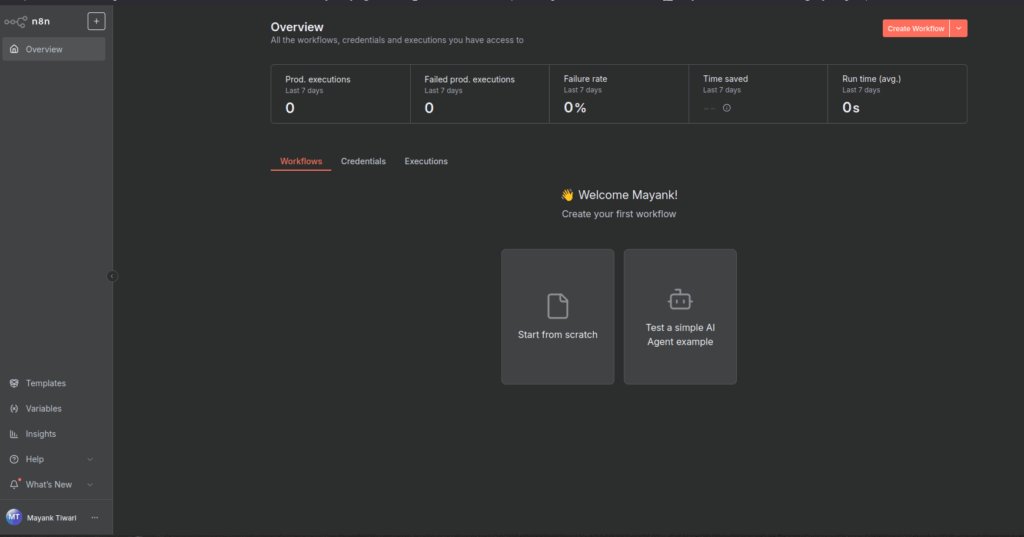
Everything looks fine until this point but there is an issue, which still needs handling. to confirm that you need to create new workflow from top right, orange button.
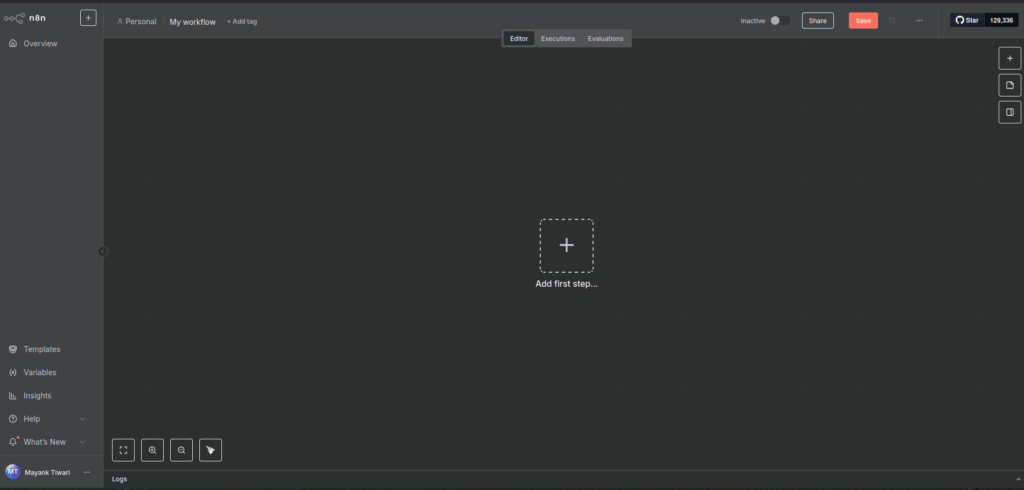
Empty workflow layout
Add a webhook node.
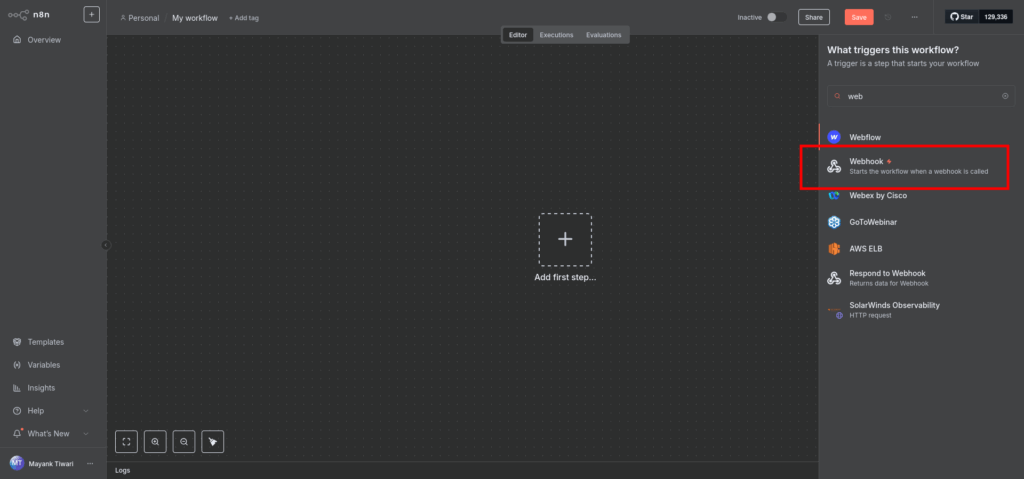
Add webhook node as starter.
Double click the node to open it’s details and check if url matches your domain or still shows localhost:5678. If it still shows localhost, we need to do little more configuration. However if you just make the call by replaceing localhost:4678 by your domain for example https://demodev.app/webhook/abc..xyz it will still work fine.
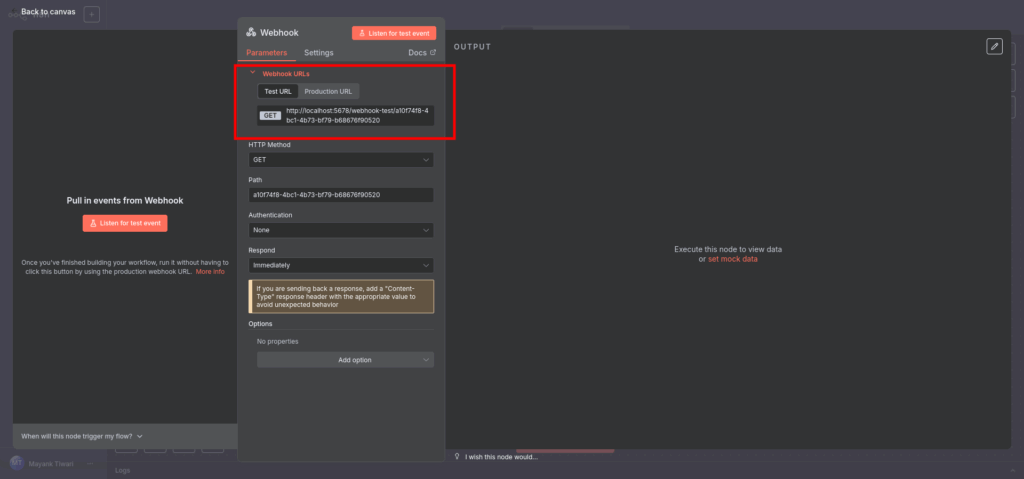
n8n webhook node detailed view
If you want to actually see the correct URL you just need to put some environment variables and test again.
nano ~/.n8n/.envPut these parameters in the .env file.
N8N_PROTOCOL=httpsN8N_HOST=demodev.appN8N_PORT=5678WEBHOOK_URL=https://demodev.appOnce done save the file and then run n8n again to test. you should now see correct URL.
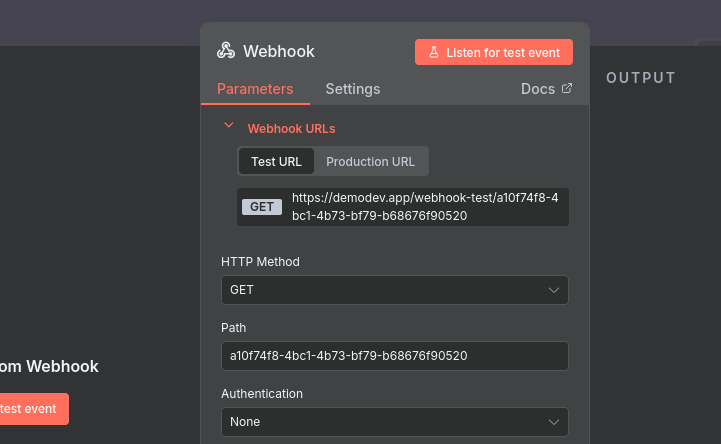
Fixed webhook URL in n8n
We still have one more issue to solve, currently if you run n8n command the terminal is occupied and you see the logs there, one way to free up is using pm2 . let’s quickly see this as well.
first let’s install pm2 globally.
npm install -g pm2then just start n8n with pm2
pm2 start "n8n" --name n8n
                        -------------
__/\\\\\\\\\\\\\____/\\\\____________/\\\\____/\\\\\\\\\_____ _\/\\\/////////\\\_\/\\\\\\________/\\\\\\__/\\\///////\\\___  _\/\\\_______\/\\\_\/\\\//\\\____/\\\//\\\_\///______\//\\\__   _\/\\\\\\\\\\\\\/__\/\\\\///\\\/\\\/_\/\\\___________/\\\/___    _\/\\\/////////____\/\\\__\///\\\/___\/\\\________/\\\//_____     _\/\\\_____________\/\\\____\///_____\/\\\_____/\\\//________      _\/\\\_____________\/\\\_____________\/\\\___/\\\/___________       _\/\\\_____________\/\\\_____________\/\\\__/\\\\\\\\\\\\\\\_        _\///______________\///______________\///__\///////////////__

                          Runtime Edition
        PM2 is a Production Process Manager for Node.js applications                     with a built-in Load Balancer.
                Start and Daemonize any application:                $ pm2 start app.js
                Load Balance 4 instances of api.js:                $ pm2 start api.js -i 4
                Monitor in production:                $ pm2 monitor
                Make pm2 auto-boot at server restart:                $ pm2 startup
                To go further checkout:                http://pm2.io/

                        -------------
[PM2] Spawning PM2 daemon with pm2_home=/home/ubuntu/.pm2[PM2] PM2 Successfully daemonized[PM2] Starting /home/ubuntu/.nvm/versions/node/v22.18.0/bin/n8n in fork_mode (1 instance)[PM2] Done.┌────┬────────┬─────────────┬─────────┬─────────┬──────────┬────────┬──────┬───────────┬──────────┬──────────┬──────────┬──────────┐│ id │ name   │ namespace   │ version │ mode    │ pid      │ uptime │ ↺    │ status    │ cpu      │ mem      │ user     │ watching │├────┼────────┼─────────────┼─────────┼─────────┼──────────┼────────┼──────┼───────────┼──────────┼──────────┼──────────┼──────────┤│ 0  │ n8n    │ default     │ 0.40.3  │ fork    │ 5242     │ 0s     │ 0    │ online    │ 0%       │ 33.0mb   │ ubuntu   │ disabled │
now you should test and see same results.
Okay well this is fine but if you are running big operations and as the size of the database grows SQLite will not be sufficient, so you should move to use postgres instead. but before doing that let’s see how easy it is to run n8n with docker.
Actually if you want to use docker in first place you would not even need to install node.js on the system only docker is fine.
Install and run n8n on Docker
As we mentioned in prerequisite that docker is required, at this stage i expect you have docker installed and you just want to run n8n there, easiest way is using docker compose.
let’s make a project folder to keep the .env file and docker-compose.yml file.
mkdir -p ~/n8n-docker && cd ~/n8n-docker
nano .env
put the same .env in there as well.
N8N_PROTOCOL=httpsN8N_HOST=demodev.appN8N_PORT=5678WEBHOOK_URL=https://demodev.appN8N_EDITOR_BASE_URL=https://demodev.appthen create the docker compose file.
nano docker-compose.ymlversion: "3.8"
services: n8n: image: n8nio/n8n:latest container_name: n8n restart: unless-stopped ports: - "5678:5678" # Nginx will proxy to this env_file: - ./.env environment: - N8N_LISTEN_ADDRESS=0.0.0.0 volumes: - n8n_data:/home/ubuntu/n8n-docker/data/ # persistent config & workflows
volumes: n8n_data:Just make sure the path you provide in the volumes actually exists.
yes that’s it, just do docker-compose up now.
docker compose up -dWARN[0000] /home/ubuntu/n8n-docker/docker-compose.yml: the attribute `version` is obsolete, it will be ignored, please remove it to avoid potential confusion[+] Running 14/14 ✔ n8n Pulled 47.8s ✔ fe07684b16b8 Pull complete 1.0s ✔ 49b72e7e39fe Pull complete 4.0s ✔ c1ab3b052759 Pull complete 4.1s ✔ 845179b1d451 Pull complete 4.2s ✔ ad03744990d9 Pull complete 6.1s ✔ 4f4fb700ef54 Pull complete 6.1s ✔ 82fe61b89c46 Pull complete 42.5s ✔ 8bbefc0a3d20 Pull complete 42.7s ✔ 61fa1f23038c Pull complete 42.7s ✔ e0b8394f15f7 Pull complete 42.7s ✔ 43ef2e487a4a Pull complete 42.9s ✔ 6e7f4382f6c9 Pull complete 43.9s ✔ 554527a3fe56 Pull complete 44.4s[+] Running 3/3 ✔ Network n8n-docker_default Created 0.1s ✔ Volume "n8n-docker_n8n_data" Created 0.0s ✔ Container n8n Started 0.6s$ docker psCONTAINER ID IMAGE COMMAND CREATED STATUS PORTS NAMESf9063badf0a8 n8nio/n8n:latest "tini -- /docker-ent…" 11 seconds ago Up 11 seconds 0.0.0.0:5678->5678/tcp, [::]:5678->5678/tcp n8nThe proxy is already in place so let’s just reload the browser and test.
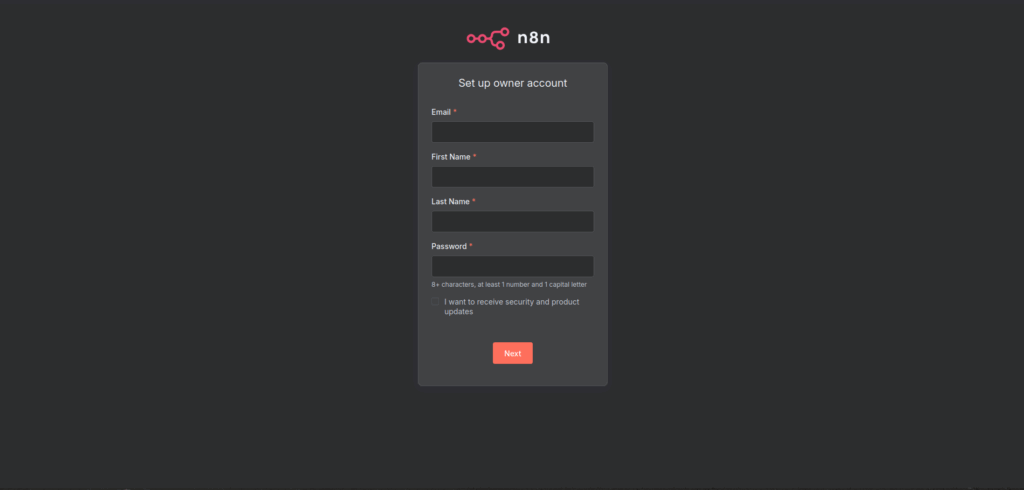
Create first account in n8n
Everything should work as expected.
Again as we discussed SQLite will be insufficient in long run so let’s just give out n8n a Postgres. to do that we need to update docker compose to include postgres.
Run n8n with PostgreSQL
I’ll start by stopping docker compose
docker compose downWARN[0000] /home/ubuntu/n8n-docker/docker-compose.yml: the attribute `version` is obsolete, it will be ignored, please remove it to avoid potential confusion[+] Running 2/2 ✔ Container n8n Removed 0.3s ✔ Network n8n-docker_default Removed 0.1s:~/n8n-docker$ docker psCONTAINER ID IMAGE COMMAND CREATED STATUS PORTS NAMES:~/n8n-docker$ docker ps -aCONTAINER ID IMAGE COMMAND CREATED STATUS PORTS NAMESbe3bb46927d1 hello-world "/hello" About an hour ago Exited (0) About an hour ago unruffled_rosalindnano .envN8N_PROTOCOL=httpsN8N_HOST=demodev.appN8N_PORT=5678WEBHOOK_URL=https://demodev.appN8N_EDITOR_BASE_URL=https://demodev.app
#This part is for n8nDB_TYPE=postgresdbDB_POSTGRESDB_HOST=postgresDB_POSTGRESDB_PORT=5432DB_POSTGRESDB_DATABASE=n8n_dbDB_POSTGRESDB_USER=n8n_userDB_POSTGRESDB_PASSWORD=someSecuredPasswordHere
#this part is for postgresPOSTGRES_DB=n8n_dbPOSTGRES_USER=n8n_userPOSTGRES_PASSWORD=someSecuredPasswordHerenow let’s update docker compose as well, again make sure the volume mapping path actually exists.
nano docker-compose.ymlversion: "3.8"
services: postgres: image: postgres:15 container_name: n8n-postgres restart: unless-stopped environment: - POSTGRES_DB=${POSTGRES_DB} - POSTGRES_USER=${POSTGRES_USER} - POSTGRES_PASSWORD=${POSTGRES_PASSWORD} volumes: - postgres_data:/home/ubuntu/n8n-docker/data healthcheck: test: ["CMD-SHELL", "pg_isready -U ${POSTGRES_USER} -d ${POSTGRES_DB}"] interval: 10s timeout: 5s retries: 10
n8n: image: n8nio/n8n:latest container_name: n8n restart: unless-stopped depends_on: postgres: condition: service_healthy ports: - "5678:5678" env_file: - ./.env environment: - N8N_LISTEN_ADDRESS=0.0.0.0 volumes: - n8n_data:/home/ubuntu/n8n-docker/data
volumes: n8n_data: postgres_data:docker compose up -dWARN[0000] /home/ubuntu/n8n-docker/docker-compose.yml: the attribute `version` is obsolete, it will be ignored, please remove it to avoid potential confusion[+] Running 15/15 ✔ postgres Pulled 12.1s ✔ 396b1da7636e Pull complete 2.7s ✔ a03503af0785 Pull complete 2.7s ✔ 9f525d1104ea Pull complete 3.0s ✔ fd87013ac660 Pull complete 3.1s ✔ f8c1b3205ec9 Pull complete 3.7s ✔ a5375d1f2b9e Pull complete 3.9s ✔ f59d823fdd89 Pull complete 3.9s ✔ f2a6712d4122 Pull complete 4.0s ✔ 254103873ab5 Pull complete 8.6s ✔ 289e360b57ea Pull complete 8.6s ✔ 8d0b35f2f6ae Pull complete 8.7s ✔ 36feeb56fd36 Pull complete 8.7s ✔ 8ed078864b8f Pull complete 8.8s ✔ bd45fc4f0bbd Pull complete 8.8s[+] Running 4/4 ✔ Network n8n-docker_default Created 0.1s ✔ Volume "n8n-docker_postgres_data" Created 0.0s ✔ Container n8n-postgres Healthy 11.0s ✔ Container n8n Started 11.0s:~/n8n-docker$ docker psCONTAINER ID IMAGE COMMAND CREATED STATUS PORTS NAMES4ea05f689323 n8nio/n8n:latest "tini -- /docker-ent…" 26 seconds ago Up 15 seconds 0.0.0.0:5678->5678/tcp, [::]:5678->5678/tcp n8n540e5c084592 postgres:15 "docker-entrypoint.s…" 26 seconds ago Up 25 seconds (healthy) 5432/tcp n8n-postgresNow test again and it should work normally like it did before.
Well for me that went really well and it’s working without issues. Hope the same goes for you if you have issues you can comment in the youtube video added at the bottom.
Now, if you don’t like docker and want to run n8n without docker we can do that as well by following the steps provided in next section.
Before that i’ll down the docker.
docker compose downWARN[0000] /home/ubuntu/n8n-docker/docker-compose.yml: the attribute `version` is obsolete, it will be ignored, please remove it to avoid potential confusion[+] Running 3/3 ✔ Container n8n Removed 0.4s ✔ Container n8n-postgres Removed 0.2s ✔ Network n8n-docker_default Removed 0.1s:~/n8n-docker$ docker psCONTAINER ID IMAGE COMMAND CREATED STATUS PORTS NAMES:~/n8n-docker$ docker ps -aCONTAINER ID IMAGE COMMAND CREATED STATUS PORTS NAMESbe3bb46927d1 hello-world "/hello" About an hour ago Exited (0) About an hour ago unruffled_rosalindRun n8n with Postgres on host without Docker
So we need postgres on the host, so install it, create database, create user and password and grant all privileges on the database for that user.
sudo apt updatesudo apt install -y postgresql postgresql-contribsudo systemctl enable --now postgresqlThis will ensure postgres is installed and enabled. Now let’s create the database and user.
:~/n8n-docker$ sudo -u postgres psqlpsql (16.9 (Ubuntu 16.9-0ubuntu0.24.04.1))Type "help" for help.
postgres=# CREATE ROLE n8n_user LOGIN PASSWORD 'someStrongPasswordHere';CREATE ROLEpostgres=# CREATE DATABASE n8n_db OWNER n8n_user;CREATE DATABASEpostgres=# \c n8n_dbYou are now connected to database "n8n_db" as user "postgres".n8n_db=# ALTER SCHEMA public OWNER TO n8n_user;ALTER SCHEMAn8n_db=# GRANT ALL ON SCHEMA public TO n8n_user;GRANTn8n_db=# \q
I’ll create a new directory and create ecosystem.config.js file there. The env can be put in this file itself.
mkdir n8n && cd n8nnano ecosystem.config.jsThe ecosystem.config.js file is for pm2, installation of pm2 i have shown already in this article above.
module.exports = {  apps: [    {      name: 'n8n',      script: 'n8n',      env: {        // Database configuration        DB_TYPE: 'postgresdb',        DB_POSTGRESDB_HOST: '127.0.0.1',        DB_POSTGRESDB_PORT: '5432',        DB_POSTGRESDB_DATABASE: 'n8n_db',        DB_POSTGRESDB_USER: 'n8n_user',        DB_POSTGRESDB_PASSWORD: 'someStrongPasswordHere',
        // Webhook / URL config        N8N_PROTOCOL: 'https',        N8N_HOST: 'demodev.app',        WEBHOOK_URL: 'https://demodev.app',        N8N_EDITOR_BASE_URL: 'https://demodev.app',
// Internal listening N8N_LISTEN_ADDRESS: '127.0.0.1', N8N_PORT: '5678' }, }, ],};pm2 start ecosystem.config.js[PM2][WARN] Applications n8n not running, starting...[PM2] App [n8n] launched (1 instances)┌────┬────────┬─────────────┬─────────┬─────────┬──────────┬────────┬──────┬───────────┬──────────┬──────────┬──────────┬──────────┐│ id │ name │ namespace │ version │ mode │ pid │ uptime │ ↺ │ status │ cpu │ mem │ user │ watching │├────┼────────┼─────────────┼─────────┼─────────┼──────────┼────────┼──────┼───────────┼──────────┼──────────┼──────────┼──────────┤│ 0 │ n8n │ default │ 0.40.3 │ fork │ 10905 │ 0s │ 0 │ online │ 0% │ 24.6mb │ ubuntu │ disabled │└────┴────────┴─────────────┴─────────┴─────────┴──────────┴────────┴──────┴───────────┴──────────┴──────────┴──────────┴──────────┘:~/n8n$ pm2 status┌────┬────────┬─────────────┬─────────┬─────────┬──────────┬────────┬──────┬───────────┬──────────┬──────────┬──────────┬──────────┐│ id │ name │ namespace │ version │ mode │ pid │ uptime │ ↺ │ status │ cpu │ mem │ user │ watching │├────┼────────┼─────────────┼─────────┼─────────┼──────────┼────────┼──────┼───────────┼──────────┼──────────┼──────────┼──────────┤│ 0 │ n8n │ default │ 0.40.3 │ fork │ 10905 │ 11s │ 0 │ online │ 0% │ 267.5mb │ ubuntu │ disabled │└────┴────────┴─────────────┴─────────┴─────────┴──────────┴────────┴──────┴───────────┴──────────┴──────────┴──────────┴──────────┘:~/n8n$ pm2 logs n8n[TAILING] Tailing last 15 lines for [n8n] process (change the value with --lines option)/home/ubuntu/.pm2/logs/n8n-error.log last 15 lines:0|n8n | (node:5242) [DEP0060] DeprecationWarning: The `util._extend` API is deprecated. Please use Object.assign() instead.0|n8n | (Use `node --trace-deprecation ...` to show where the warning was created)
/home/ubuntu/.pm2/logs/n8n-out.log last 15 lines:0|n8n | Starting migration AddProjectDescriptionColumn17478242390000|n8n | Finished migration AddProjectDescriptionColumn17478242390000|n8n | Starting migration AddLastActiveAtColumnToUser17502521391660|n8n | Finished migration AddLastActiveAtColumnToUser17502521391660|n8n | Starting migration AddInputsOutputsToTestCaseExecution17526697930000|n8n | Finished migration AddInputsOutputsToTestCaseExecution17526697930000|n8n |0|n8n | There is a deprecation related to your environment variables. Please take the recommended actions to update your configuration:0|n8n | - N8N_RUNNERS_ENABLED -> Running n8n without task runners is deprecated. Task runners will be turned on by default in a future version. Please set `N8N_RUNNERS_ENABLED=true` to enable task runners now and avoid potential issues in the future. Learn more: https://docs.n8n.io/hosting/configuration/task-runners/0|n8n |0|n8n | [license SDK] Skipping renewal on init: license cert is not initialized0|n8n | Version: 1.106.30|n8n |0|n8n | Editor is now accessible via:0|n8n | https://demodev.appBecause we have been using same nginx config for reverse proxy it should work as it is, open the URL and test. It should work normally as expected.
To enable the autostart of pm2 on reboot just save it and set it for startup.
pm2 savepm2 startupn8n has great potential and with it’s AI nodes it becomes a great and powerful tool for automation. You can subscribe to my youtube channel for video tutorials. The Video version of this tutorial is given below.
If you have any issues you can reach out by commenting on the youtube video: